
Free stock image platforms and downloadable image bundles see constant use by designers, marketers, educators, content creators, and developers.
Convenience and zero cost make these resources attractive, yet hidden risks often go unnoticed.
Cybercriminals increasingly disguise malware, phishing tools, and unwanted software as harmless image files or image collections.
Stock image-related downloads now serve as a frequent entry point for social engineering and malware distribution campaigns.
Awareness and cautious behavior remain the most reliable defenses against these threats.
How Fake Downloads Disguise Themselves
Deceptive download methods rely on familiarity and convenience.
Attackers design fake stock image offers to mirror trusted workflows used by creatives, making harmful files feel routine and safe.
Disguise techniques focus on visual cues, file naming habits, and download expectations built over years of legitimate use.
Malicious Executables Disguised as Image Files
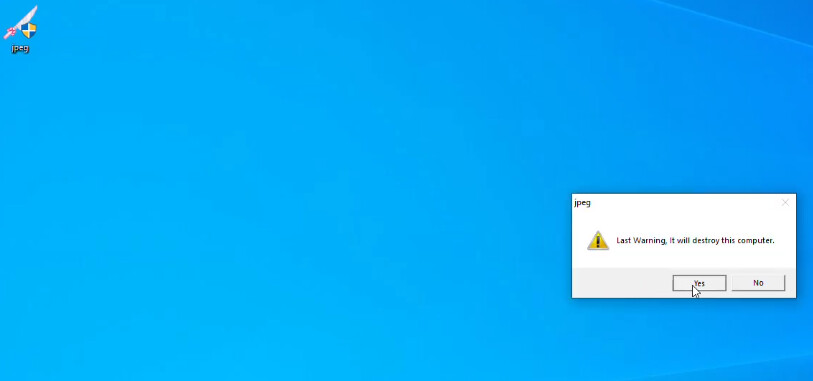
Executable files often get renamed to mimic common image formats.
Operating systems that hide known file extensions allow names like sunset.jpg.exe to appear identical to standard photos.
User interaction triggers execution, not image preview, which opens a path for system compromise.
Damage may occur instantly or silently in background processes.
Common consequences tied to such files include:
- Installation of remote access tools that grant attackers persistent control
- Credential theft through keylogging components
- Silent data exfiltration targeting saved browser sessions and documents
Lack of visible warnings reinforces trust, especially during rushed workflows.
Fake Image Bundle Promotions
Large image packs advertised as professional grade resources attract attention through scale and perceived value.
Offers promising hundreds of photos for free often hide malicious payloads within compressed archives or installers.
Pirated design software frequently adds bonus image folders that mask threats inside keygen or patch directories.
Free creative assets become a delivery channel for malware once trust replaces scrutiny:
- Warning signs often appear in how these bundles get packaged
- Password-protected archives with vague instructions
- Setup files required before image access
- Additional folders labeled as cracks, patches, or activators
Convenience becomes leverage in such attacks.
Malicious Advertisements and Malvertising
Fake stock platforms and low-quality blogs rely heavily on deceptive advertising layouts.
Download buttons often trigger installers or automatic downloads instead of direct image files.
Even reputable sites may display malicious ads through compromised ad networks, placing risk outside direct site control.
Clicking any prominent button can result in bundled software installation rather than a simple file transfer.
Common Red Flags to Watch Out For
Risk indicators often appear early, yet habit and speed cause many users to ignore them.
Recognition of visual, technical, and contextual warning signs reduces exposure before any file gets opened or installed.
Suspicious Domains and File Sources
Suspicious domains rely on visual similarity to trusted brands. Slight spelling changes, extra words, or unusual domain endings create convincing imitations.
Sites such as stockimage-downloadfree.com or unsplahh.net aim to capture trust built around well-known platforms.
Third-party download portals increase risk by repackaging files and adding unwanted software. This is especially true for unfamiliar entertainment or gaming sources, unless they are verified non-GamStop gaming sites with good reputation.
Common traits linked to unsafe sources include:
- Domain names with extra hyphens, numbers, or misspellings
- Download pages hosted on unrelated blogging platforms
- File hosting services that rotate links frequently
Source credibility matters as much as file appearance.
Deceptive Download Interfaces
Deceptive interfaces use visual overload to guide clicks. Multiple brightly colored download buttons compete for attention, making it difficult to identify legitimate links.
Captchas sometimes serve as distractions while background downloads begin without clear consent.
User focus shifts toward passing visual obstacles instead of verifying actions.
Interface behavior that signals danger often includes:
- Automatic downloads triggered before confirmation
- Redirect chains after clicking a button
- Prompts asking to install helper tools or managers
- Confusion benefits attackers more than users.
Mismatch Between Image and Context
Context often reveals deception faster than technical analysis.
Luxury product images placed on poorly written pages suggest stolen visuals.
Claims of exclusivity collapse when identical photos appear across unrelated platforms through reverse search. Visual quality alone never confirms legitimacy.
Permissions Abuse in Related Apps
Image viewers and download helpers sometimes request excessive permissions unrelated to basic functionality.
Requests for camera, microphone, contact lists, or call logs raise immediate concerns.
Such access enables surveillance, data harvesting, and further compromise.
Additional indicators tied to malicious apps include:
- Blurry icons or inconsistent branding
- Sparse descriptions with generic language
- Developer names lacking history or transparency
Permissions reveal intent more clearly than marketing claims.
What are the Tactics Used by Cybercriminals
Image based scams combine visual trust with psychological pressure.
Familiar creative workflows reduce skepticism, allowing attackers to guide users into unsafe actions without technical exploitation.
Psychological Manipulation and Social Engineering
Pop ups claiming outdated photo editing software push fake updates that install malware.
Urgency driven messages like “Image pack expires in 24 hours” rush decisions and discourage verification.
Emotional triggers replace careful review, leading users to prioritize speed over safety.
Pressure tactics often rely on:
- Time limited offers designed to bypass caution
- Authority claims tied to fake system alerts
- Fear of missing out on free professional resources
Each tactic narrows attention and lowers resistance.
File Name and Icon Spoofing
Malware authors copy trusted file icons associated with images or documents.
Double extensions such as .jpg.exe or .png.scr rely on visual similarity to legitimate files.
Familiar icons signal safety, even when actual file behavior contradicts expectations.
Bundled Software and Download Managers
Image collections may include authentic photos wrapped inside installers.
Additional programs like browser hijackers or crypto miners install quietly during setup.
Focus stays on extracted images, while background processes alter system behavior without notice.
When the Image Looks Safe
Visual trust forms quickly. Clean photography and professional composition often override caution, allowing malicious content to pass initial inspection.
Safe Looking Images Used for Malicious Purposes
Attackers reuse polished images taken from legitimate sources.
Branding often gets removed and context shifts to support scams or fake offers.
Familiar visuals reduce suspicion and encourage engagement, especially on social platforms or download pages.
Metadata and EXIF Inspection
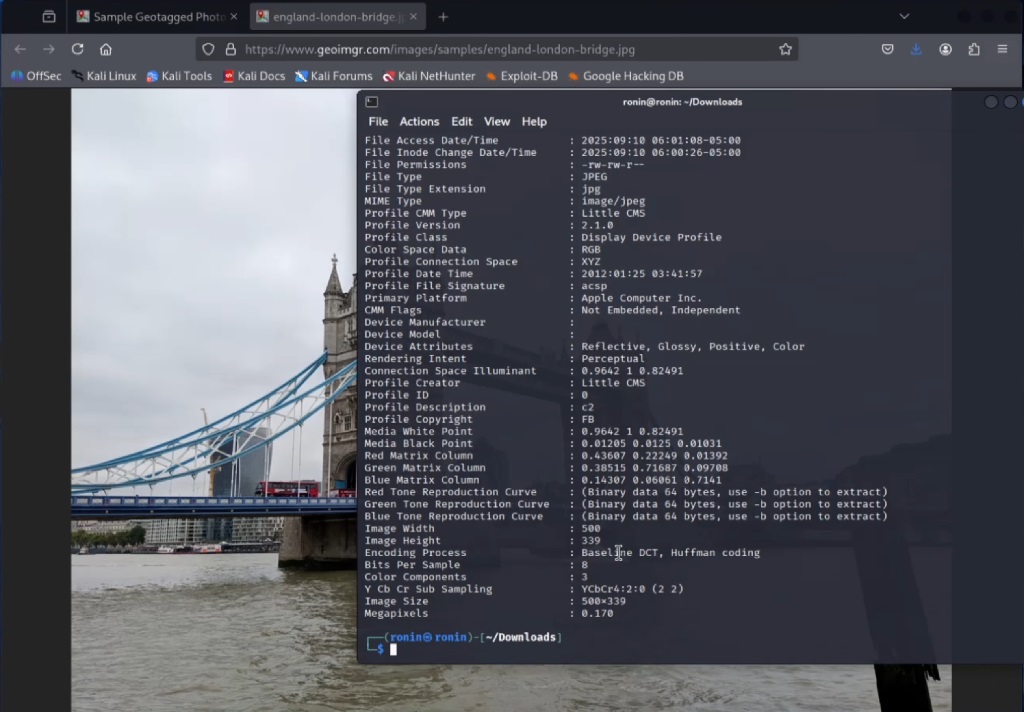
Metadata inspection tools expose camera details, GPS data, and editing history.
Fraudulent images often show stripped or manipulated metadata designed to erase origin clues.
Missing camera information raises questions about image authenticity and source integrity.
Key indicators visible through metadata checks include:
- Absence of camera make and model
- Inconsistent timestamps
- Editing software entries that conflict with claims
Such gaps suggest intentional alteration.
Reverse Image Search as a Verification Tool
Reverse image search tools uncover reused celebrity endorsements, scam listings, and fake profiles.
Images claimed as exclusive lose credibility once identical copies appear across unrelated sites.
Verification adds context that visuals alone cannot provide.
AI-Powered Image Forensics
Advanced analysis tools detect deepfakes, reused scam visuals, and subtle inconsistencies invisible to the human eye.
Automated checks strengthen defense against manipulated imagery used in fraud campaigns.
The Stock Image Download Safety Checklist
Safe habits rely on repeatable checks applied before every download. Consistency prevents shortcuts that attackers exploit.
Download Only Through Trusted Platforms
Established platforms like Unsplash, Pexels, Adobe Stock, Shutterstock, and Pixabay maintain stronger controls and review processes.
Forums, email links, and ad banners lack accountability and introduce unnecessary exposure.
Enable File Extension Visibility
Displaying full file extensions on Windows exposes executable formats disguised as images.
Formats such as .exe, .scr, .js, or .bat become visible instead of hidden behind fake thumbnails. Visibility blocks accidental execution.
Check File Size and File Type
File size often contradicts marketing claims. A small archive promising hundreds of high resolution images signals deception.
Any JPG that launches an installer or setup window requires immediate termination and deletion.
Verify Authenticity with Reverse Image Search
Reverse image search uncovers reuse patterns tied to scams, copyright misuse, or false endorsements.
Context gained through search results supports safer decisions before creative use.
Scan Files with Antivirus Tools
Uploading image packs or compressed archives to VirusTotal before opening detects many known threats. Multi-engine scans increase detection accuracy and reduce reliance on a single security product.
Review App Permissions and Metadata
Image related apps should never request access to contacts, SMS, or call logs. Metadata checks reveal origin inconsistencies, while low quality interfaces and vague developer identities signal fraudulent intent.
Closing Thoughts
Free resources never justify unnecessary risk. Cybercriminals rely on lowered guard levels around innocent looking image files.
Consistent habits like extension checks, reverse searches, metadata inspection, and malware scanning reduce exposure.
Visual deception often appears subtle, yet combining basic tools with caution builds strong protection.
Cybersecurity reflects professionalism, not paranoia. Precautions function like seatbelts, rarely noticed but critical at the right moment.