
Gaming website design needs more than strong visuals. A site may look exciting, but a weak layout can slow players down, hide key actions, and reduce engagement.
Gaming websites help promote games and studios, guide users toward new titles, speed up gameplay access, build community, and encourage repeat visits.
A strong site can showcase trailers, screenshots, reviews, patches, updates, downloads, and game-related content while also helping monetization.
Let’s check some tips that can actually help you ensure the best possible user experience.
Tip #1 – Put the Main Game or Action Above the Fold
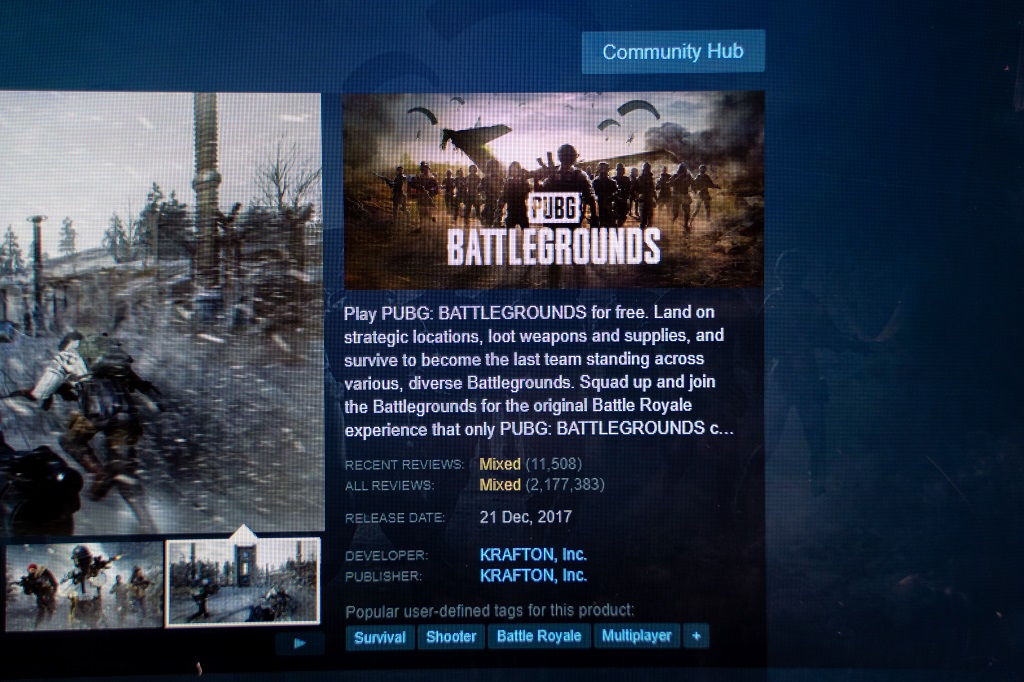
Visitors should know what the site offers as soon as it loads. Many users arrive ready to play, download, buy, watch a trailer, join a beta, or check updates.
A strong hero section should include the featured game, trailer, gameplay preview, or play button.
Add a clear headline and one main call to action, such as “Play Now,” “Download,” “Watch Trailer,” “Buy Now,” or “Join Beta.”
Add one secondary action for browsing games, reading updates, or learning more.
First-screen content needs to answer key intent quickly:
- What game or experience is being offered
- Why a visitor should care
- Which action should happen next
For browser-based games, a table game experience should sit close to the homepage so players can start without clicking through several pages.
Controls should be bold, visible, familiar, and easy to use. Game variations should also be easy to reach on the homepage.
Players should not click through several pages before starting.
Controls should be bold, visible, familiar, and easy to use. Game variations should also be easy to reach on the homepage.
Tip #2 – Use Clear Visual Hierarchy to Guide Player Attention
Visual hierarchy organizes page elements so users notice key content first.
Gaming sites often use bold art, trailers, motion, and color, so hierarchy helps prevent visual overload.
Priority should shape how each element looks and where it appears:
- Main CTA with the strongest size, spacing, and contrast
- Game title, rating, offer, or platform badge near the main visual
- Trailer, screenshots, game modes, and feature cards ordered by user intent
Avoid making every section equally loud. When all elements compete, users lose the path.
A better layout guides attention through the hero visual, game promise, proof points, media, and call to action.
Strong visuals can create immersion, but text placement and interface design still need purpose.
Buttons, menus, cards, and content blocks should help users navigate, find information, and complete actions.
Tip #3 – Keep Navigation Simple, Familiar, and Fast
Gaming audiences often want quick access.
Navigation should help them play, download, buy, check updates, or reach support without delay.
Useful navigation items may include Games, News, Updates, Community, Support, Store, Download, Account, and Login.
Clear labels work better than branded or cryptic names.
Larger gaming sites can use expanded menus when content volume makes simple top-level navigation too limited:
- Category menus for genres, platforms, or game types
- Store menus for games, software, merchandise, or downloadable assets
- Community menus for forums, events, rankings, or creator resources
Keep those menus organized and easy to scan. Simple navigation also helps search visibility because users and search engines can move through the site more easily.
Even busy gaming platforms need visible menus, predictable paths, and fast access to key pages.
Tip #4 – Design Around the Target Audience and Game Genre

Layout should match the players and the game type. A horror game site, an esports hub, a casual puzzle site, an indie game page, and a kids’ gaming portal need different structures.
Design decisions should account for audience age, genre, skill level, device type, monetization model, community size, website purpose, team size, and budget.
Genre and site purpose can change the page structure in practical ways:
- Casual games need a simple grid, large buttons, and minimal onboarding
- Esports sites need live scores, schedules, team pages, rankings, and news modules
- RPG and fantasy sites need lore sections, character pages, world details, and cinematic media
- Indie game pages often need a trailer-first layout, wishlist button, download button, or purchase CTA
- Large communities need news, store pages, forums, assets, support, and downloads
Audience research can guide layout choices through surveys, interviews, player feedback, and competitor review.
Common gaming site formats include game information portals, review sites, landing pages, and stand-alone platforms.
Format should match community size, game type, available material, popularity, budget, and team capacity.
Tip #5 – Make the Layout Responsive and Mobile-Friendly
Many visitors reach gaming websites on phones through social media, ads, app stores, forums, search results, and community links.
A mobile site should not feel like a squeezed desktop page.
Mobile layout should prioritize a fast hero section, readable fonts, thumb-friendly buttons, collapsible navigation, short content blocks, and optimized images and videos.
A sticky call-to-action button can help users act without scrolling back.
Small-screen design should focus on the shortest action path:
- Watch a trailer
- Start playing
- Download a game
- Buy or wishlist
- Sign up or join a beta
- Open support or community pages
Responsive design lets users navigate, read, and interact across phones, tablets, laptops, and desktops.
Screen size, timing, movement, and interaction all affect usability, so layouts need testing across devices.
Poor mobile layouts create tiny buttons, crowded menus, slow trailers, and hard-to-read text. A better mobile layout gives users the fastest path to act.
Tip #6 – Use Multimedia Without Slowing or Cluttering the Page
Gaming sites need strong media, but heavy visuals can hurt speed and clarity.
Trailers, screenshots, gameplay clips, character cards, animations, and background art should build excitement without hiding the main action.
Useful media sections can add proof and atmosphere when each one has a clear role:
- Trailer area for fast interest
- Screenshot gallery for visual proof
- Character or feature cards for scannable details
- Gameplay clips for mechanics and pacing
- Behind-the-scenes videos or downloadable materials for larger communities
High-quality images and videos help showcase gameplay and promote key selling points.
Visual-heavy pages can communicate the game’s vision, but placement matters when many elements appear on one page.
Compress images and videos, avoid autoplay with sound, keep background animations subtle, and use lazy loading for galleries.
Multimedia should create atmosphere, prove gameplay quality, and increase excitement without slowing the page or burying the CTA.
Tip #7 – Balance Monetization, Accounts, and Ads With Playability
Ads, subscriptions, account prompts, purchase messages, and banners should not block play.
Revenue features need careful placement so they do not damage trust or usability.
Ad placement needs enough space around gameplay and controls:
- Keep ads outside the main gameplay area
- Avoid accidental-click zones near controls
- Add spacing around ads on mobile screens
- Limit pop-ups during active play
Too many ads can slow loading, confuse visitors, and reduce search performance. Pop-ups and banners should appear sparingly.
Account creation should not come too early. Let users see value before asking them to register.
A balanced approach lets players start without registration, then offers account perks such as saved progress, rewards, stats, tracking, custom designs, personalization, and community features.
Purchase prompts should stay visible but not disruptive. A focused audience usually performs better than broad ad targeting.
Monetization should help the business model without making the site frustrating.
Summary
Great gaming website layouts feel immersive without becoming confusing. Visual style attracts attention, but layout helps users play, buy, learn, return, and connect.
Strong layout priorities include fast access to the main action, clear hierarchy, simple navigation, audience-aware design, responsive structure, smart media use, and monetization that does not interrupt play.
Game selection, navigation, ease of use, performance, monetization, and user experience all affect return visits.
Website format should match the audience, purpose, popularity, available material, and team capacity.