
Amazon product image requirements in 2026 are strict but manageable: every Amazon listing needs at least one compliant main image, the product should fill 85% or more of the frame, the main image background must be pure white (RGB 255, 255, 255), and the file should be large enough for zoom.
Amazon accepts JPEG, TIFF, PNG, and non-animated GIF formats, with image dimensions from 500 to 10,000 pixels on the longest side, while Seller Central guidance says images larger than 1,000 pixels help shoppers zoom in.
For sellers, agencies, and brand owners, image compliance matters because Amazon’s main image appears in search results, ads, recommendation modules, and product detail pages.
A weak image can reduce clicks; a non-compliant image can create listing suppression, editing delays, or conversion loss.
Amazon Product Image Requirements At A Glance
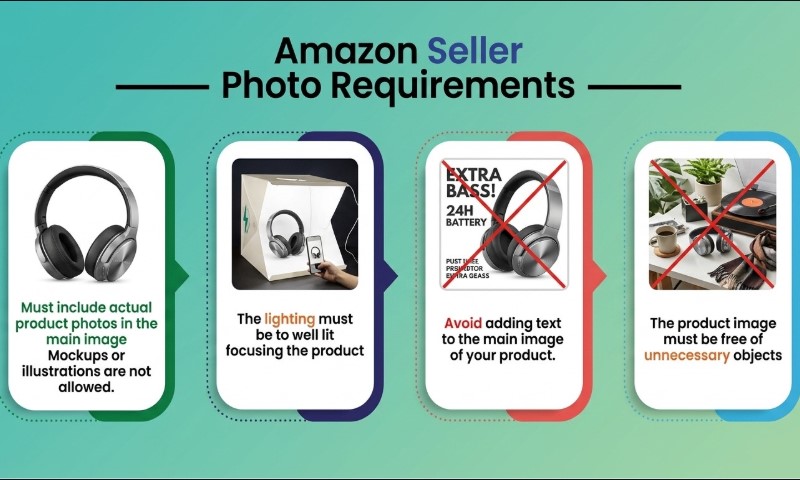
Amazon separates image rules into technical file requirements and main image content rules. Technical rules apply across product images.
Main image rules are stricter because the first image represents the offer in search results and on the product detail page. Amazon also recommends at least six images and one video for a stronger listing experience.
| Requirement | 2026 Working Standard | Why It Matters |
| Minimum image dimension | 500 px on longest side | Minimum upload threshold |
| Better zoom target | Over 1,000 px | Enables shopper zoom |
| Practical seller target | 1,600 to 2,000 px square | Sharper zoom and mobile display |
| Maximum dimension | 10,000 px on longest side | Avoids upload rejection |
| Main image background | Pure white, RGB 255, 255, 255 | Required for main image consistency |
| Product fill | 85% or more | Keeps item visible in search |
| Accepted formats | JPEG, TIFF, PNG, non-animated GIF | JPEG remains preferred |
| Main image overlays | No text, logos, borders, watermarks, graphics | Avoids policy violations |
What Size Should Amazon Product Images Be In 2026?
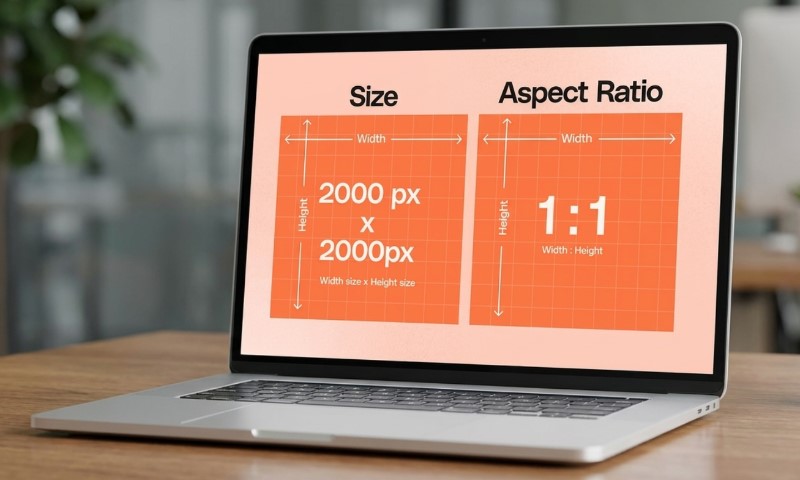
A safe Amazon product image size in 2026 is 2,000 x 2,000 pixels for square product photos, saved as a high-quality JPEG. Amazon’s technical minimum is lower, 500 pixels on the longest side, but images above 1,000 pixels are the better baseline for zoom quality.
A 1,000 x 1,000 pixel image can meet the basic zoom threshold in many cases, but it leaves little room for cropping, compression, or detail inspection.
For a watch, leather bag, cosmetic bottle, supplement label, or electronics accessory, 1,600 to 2,000 pixels gives shoppers enough detail to inspect texture, ports, stitching, ingredients, or scale markers.
A practical agency export standard looks like:
- Main image: 2,000 x 2,000 px, JPEG, white background.
- Secondary lifestyle image: 2,000 px on the longest side.
- Close-up detail image: 2,000 x 2,000 px or larger, cropped cleanly.
- Infographic image: 2,000 x 2,000 px, readable on mobile.
What Are Amazon Main Image Rules?
Amazon’s main image must show the actual product being sold, with no confusing extras, no decorative background, and no promotional overlays. The product should fill 85% of the image, while text, logos, borders, color blocks, watermarks, or extra graphics cannot appear over the product or in the background.
Main image rules are strict because the first image works like a visual contract. If a shopper sees a tripod, storage case, cable, gift box, spoon, chair, or phone in the main image, Amazon wants the shopper to know whether that item is included. Props that create doubt should move to secondary images or be removed.
What Counts As A Pure White Background?
Pure white means RGB 255, 255, 255, also written as hex #FFFFFF. A light gray studio sweep, cream backdrop, shadowy white paper, or slightly warm background can still fail because it is not mathematically pure white. Amazon uses pure white backgrounds to create a consistent shopping experience across search and detail pages.
A common mistake is photographing a product on a white table and exporting without background cleanup. To the eye, the result looks white. In editing software, pixel sampling often shows values like RGB 248, 248, 246 or RGB 241, 244, 247. That is not pure white.
For clean compliance, remove the background, place the product on #FFFFFF, preserve natural edges, and avoid heavy gray shadows. Very subtle natural shadows may appear in some categories, but sellers should be careful because shadowy backgrounds can trigger automated checks or manual rejection.
What Should Not Appear In A Main Image?
A main image should not include text, badges, promotional graphics, logos added in editing, borders, inset images, watermarks, props, or accessories outside the purchase.
Amazon’s rules place the burden on sellers to make the offer visually accurate, not just attractive.
Examples of risky main image choices:
- “Best Seller” or “2 Pack” badge added over the product.
- Lifestyle scene for a kitchen utensil with food, plates, and flowers.
- A phone case shown with an iPhone when the phone is not included.
- A backpack shown with laptop, sunglasses, bottle, and notebook.
- Before-and-after graphic for skincare or cleaning products.
- Brand logo placed in a corner as a watermark.
Packaging is different. If the packaging is part of what the buyer receives, such as a supplement bottle, cosmetics box, retail toy box, or gift-ready case, it may belong in the image.
The safest test is simple: if the customer pays for it and receives it, it can usually appear. If it merely decorates the shot, avoid it in the main image.
How Does Zoom Quality Affect Conversion?
Zoom quality affects conversion because shoppers use zoom to inspect risk signals: material, finish, stitching, ports, label text, scale, texture, and package condition. In Amazon’s selling blog, zoom is presented as one way better product photos can support sales.
In 2026, zoom quality matters even more because Amazon shopping journeys are highly visual. Amazon researchers have also described visual matching experiments that combine image matching with text alignment, reporting relative click-through improvements when multimodal signals were added.
For sellers, the takeaway is practical: a crisp product photo helps both people and automated systems identify the product accurately. Blurry edges, compression blocks, muddy shadows, warped colors, and tiny product crops work against trust.
Main Image Size: 1000 px, 1600 px, Or 2000 px?
Use 2,000 x 2,000 pixels when possible. A 1,000 pixel image may activate zoom, but 1,600 to 2,000 pixels gives a better margin for compression, retina displays, mobile zoom, and category-level detail.
Amazon’s official technical range allows up to 10,000 pixels on the longest side, so 2,000 pixels sits safely inside the accepted range.
| Image Size | Best Use | Risk Level |
| 500 x 500 px | Bare minimum upload | Poor detail, weak zoom |
| 1,000 x 1,000 px | Basic compliance | Can look soft after compression |
| 1,600 x 1,600 px | Solid general standard | Good balance |
| 2,000 x 2,000 px | Strong main image target | Recommended for most sellers |
| Over 5,000 px | Large originals or technical products | Larger file handling needed |
A square 1:1 crop is usually the cleanest choice for search grids and product pages. Amazon can display non-square images, but square layouts reduce accidental cropping and keep the product visually balanced.
Secondary Images: Where Sellers Can Add Context
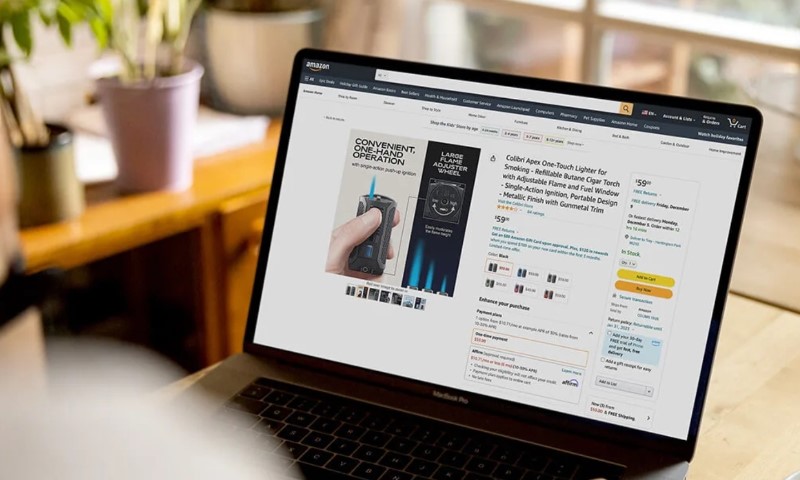
Secondary images can do what the main image cannot: show lifestyle context, scale, instructions, benefits, internal parts, fabric texture, comparison charts, and use cases.
A good image set gives sellers enough space to answer buyer objections visually without breaking the main image rules.
A strong seven-asset image set might include:
- Main image on pure white.
- Scale image with hand, model, room, or known object.
- Close-up detail image.
- Feature callout image with short labels.
- Lifestyle image showing product use.
- What’s-in-the-box image.
- Comparison or size chart.
For example, a yoga mat listing can keep the main image plain and compliant, then use secondary images for thickness, grip texture, carrying strap, cleaning instructions, and model height context.
A coffee grinder listing can show the grinder alone first, then reveal grind settings, burr detail, cup size, counter footprint, and cleaning brush inclusion.
Category Exceptions And Extra Rules
Amazon category rules can add extra image requirements, especially for clothing, shoes, media products, jewelry, books, and handmade goods.
For example, Handmade image guidance repeats the pure white main image rule and warns against excluded accessories, props, text, logos, watermarks, or inset images.
Books, music, and video media often rely on cover art. Apparel may need a model or front-facing view. Bundles and multipacks must clearly show quantity without misleading shoppers. Product variants also need accurate images for color, size, pattern, and package count.
Sellers should check the category style guide before final export. A main image that works for a stainless-steel bottle may fail for a dress, necklace, shoe, or downloadable media item.
Common Image Mistakes That Cause Trouble
Many Amazon image problems are not creative problems. They are production workflow problems. A photographer shoots well, then an editor exports with gray edges.
A designer adds a badge to improve the click-through rate. A brand manager approves a lifestyle main image because it looks premium. Amazon may still treat the file as non-compliant.
Frequent issues include:
- Product fills far below 85% of the frame.
- White background is actually light gray.
- File is under 1,000 px, disabling zoom.
- Main image contains a text callout.
- Secondary accessory appears but is not included.
- Product color shifts because of poor white balance.
- Image is over-compressed and pixelated.
- Variant image shows the wrong color or bundle size.
Before upload, inspect the image at 100% zoom and sample the background color. Then compare the final exported file, not the editing file. Compression and export settings can change edge quality.
2026 Workflow For Amazon-Ready Product Images
A reliable 2026 workflow starts before the photoshoot. Write a shot list, confirm what is included in the box, check category rules, and plan one compliant main image before any lifestyle concepts.
Amazon accepts multiple formats, but JPEG remains preferred in Amazon’s selling guide for many product image workflows.
A clean workflow:
- Shoot the product with sharp focus and accurate color.
- Remove the background for the main image.
- Place the product on RGB 255, 255, 255.
- Crop so the item fills at least 85% of the frame.
- Export at 2,000 x 2,000 px when possible.
- Use JPEG for most listings.
- Check file size, sharpness, and background values.
- Upload the main image plus six useful secondary assets.
- Review the live listing on desktop and mobile.
For brands using AI image editing tools, compliance review still matters. Generated backgrounds, synthetic props, fake reflections, altered product geometry, or invented packaging can misrepresent the item. Amazon image policy is built around accuracy, not just appearance.
Summary
Amazon product image requirements in 2026 reward clarity, accuracy, and consistency, like product images on Etsy and other selling websites. The safest main image is a sharp, realistic product photo on pure white RGB 255, 255, 255, with the product filling at least 85% of the frame and no added text, badges, borders, watermarks, or props.
Technically, Amazon accepts 500 to 10,000 pixels on the longest side, but sellers should work above 1,000 pixels for zoom and usually export around 2,000 x 2,000 pixels for a stronger detail-page experience.
Good secondary images can be more persuasive, but the main image has one job: make the exact product instantly clear to shoppers and compliant for Amazon’s catalog systems.